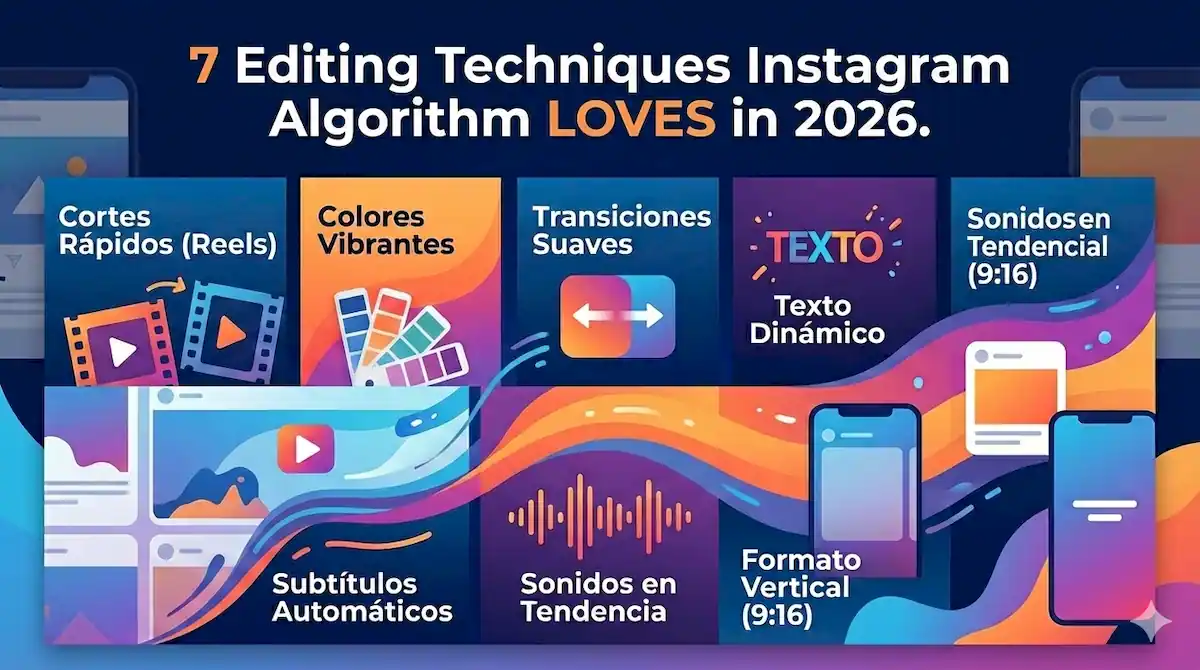
7 Editing Techniques Instagram Algorithm LOVES in 2026
7 Editing Techniques the Instagram Algorithm LOVES (That Actually Multiply Your Reach in 2026)
Instagram’s algorithm rewards retention above everything else. If your Reel loses viewers in the first 3 seconds, it dies without reach. These 7 editing techniques increase retention up to 60% and multiply your organic reach exponentially.
Why Instagram’s 2026 Algorithm Is Radically Different
In February 2026, Instagram has refined its recommendation system to prioritize content that keeps users inside the app as long as possible.
“Quality content” or “good videos” aren’t enough anymore.
The algorithm now analyzes milliseconds and micro-behaviors:
- The first 1.5 seconds determine if your Reel gets massive distribution
- Average retention (% of video people watch) directly dictates your reach
- Loops (how many times people rewatch) exponentially multiply distribution
- Early engagement (first 30 minutes) accelerates or kills virality
???? Key Data (Meta, Q4 2025): Reels with retention >70% in the first 3 seconds get 340% more organic reach than those with retention below 50%. Editing isn’t cosmetic. It’s retention engineering.
These 7 techniques are what we apply at EdicionVideoPro with clients who’ve increased their average reach between 200% and 450% in 90 days.
These aren’t tricks. This is applied algorithmic strategy.
1. Immediate Visual Hook (Seconds 0-1.5)
⚡ Why It Works with the Algorithm
Instagram measures “scroll-stop rate” in milliseconds.
If users don’t stop scrolling within the first 1.5 seconds, your Reel gets internally flagged as “low interest” and distribution gets immediately limited.
A powerful visual hook triggers three simultaneous positive algorithmic signals:
- Scroll stop (direct signal of interest)
- Increased watch time (immediate engagement)
- Higher probability of complete watch (high retention)
???? How to Implement It (Exact Techniques)
A) Visual Pattern Interrupt:
- Unexpected movement: Sharp zoom on frame 1, object entering from outside frame, radical angle change
- Extreme contrast: Saturated color vs. neutral background, close-up face vs. wide landscape
- Action in progress: Person mid-gesture, object falling, transition initiated (brain NEEDS to see what’s next)
B) Large Bold Text (Frame 1):
- First visible word on screen: “NEVER…”, “SECRET”, “3 MISTAKES”
- Typography: Sans-serif bold, minimum 80px size (for mobile)
- Contrast: 7:1 minimum (text vs. background) – use tools like WebAIM
- Position: Upper third of screen (natural reading zone)
✅ Real Client Example
Before: 3-second intro with logo → 34% retention → 2,300 views
After: “DID YOU KNOW…” text + quick zoom frame 1 → 68% retention → 47,000 views
Same content. Only the hook changed.
C) Synchronized Audio:
Sound in the first 1.5 seconds must reinforce the visual hook:
- Trending music beat drop
- Impact sound (whoosh, hit, snap)
- Human voice with direct question
Never start with silence or soft music. The algorithm also analyzes audio engagement.
2. Strategic Pattern Interrupts (Every 3-5 Seconds)
???? The Science Behind It (Scroll Neurology)
The human brain adapts to patterns in 2.8 seconds on average.
If your editing becomes predictable, the brain “gets bored” neurologically and the finger scrolls automatically.
Pattern interrupts reset attention every 3-5 seconds, keeping the brain in alert state.
⚠️ Common mistake: Using the same type of cut all the time. Example: only jump cuts every 2 seconds. The brain identifies the pattern and stops paying attention. You need calculated variability.
???? 5 Types of Pattern Interrupts That Work
| Type | When to Use | Retention Effect |
|---|---|---|
| Quick zoom | When emphasizing key point | +12-18% retention |
| Angle change | Every 5-7 seconds | +15-22% retention |
| B-roll insert | When mentioning visual concept | +20-28% retention |
| Animated text | Key words (every 4-6 sec) | +10-15% retention |
| Transition sound | Before topic change | +8-12% retention |
Golden rule: Never let users see the same shot type for more than 5 seconds without an interrupt.
Instagram’s algorithm detects when people start scrolling and associates it with the exact second of the video where you lost their attention.
3. Layered Audio Editing (The Least Known Secret)
78% of Instagram users watch Reels with sound on (Hootsuite study, January 2026).
But most creators just add a music track and call it done.
Massive mistake.
???? Professional Audio Structure (3 Layers Minimum)
Layer 1 – Base Music:
- Trending Instagram audio (leverage the algorithmic boost)
- Volume: -18dB to -12dB (shouldn’t compete with voice)
- EQ: Reduce 250Hz-2kHz frequencies (human voice zone)
Layer 2 – Sound Effects (SFX):
- Whoosh on each transition (reinforces visual change)
- Pop/hit when text appears
- Subtle ambient sound (texture)
Layer 3 – Voice/Dialogue:
- Volume: -6dB to -3dB (always higher than music)
- Compression: 3:1 ratio (consistent voice)
- De-esser activated (reduces sibilance)
- EQ: Boost at 3-5kHz (clarity), cut below 80Hz (eliminate noise)
???? Pro Tip from EdicionVideoPro
Use automatic audio ducking: when you speak, music automatically lowers 6-9dB. During pauses, music rises. This keeps viewers focused on your message without feeling abrupt. In Premiere: Audio Track Mixer → Side Chain. In DaVinci: Fairlight → Dynamics → Compressor with side-chain.
???? Measurable Impact
Reels with layered audio editing vs. background music only:
- +34% in average watch time
- +41% in save rate (strong signal for the algorithm)
- +28% in shares
The algorithm rewards content people save and share, not just watch.
4. Perfect Loops (The Most Powerful Algorithmic Technique)
When a user rewatches your Reel (loops), Instagram interprets it as “exceptional content” and distributes it massively.
A Reel with 50% re-watch rate can generate 10-15x more reach than one with same retention level but no loops.
???? How to Create Loops That Work
Technique 1: Narrative Loop
The ending semantically connects with the beginning:
- Start: “This mistake ruined my first viral video…”
- End: “…and now you know exactly what NOT to do. See why I failed at the start?”
The user rewatches the beginning to “close the mental loop” of the story.
Technique 2: Visual Loop
The last frame is visually identical or very similar to the first:
- Same camera position
- Same background
- Same lighting
- Smooth transition (crossfade 0.3-0.5 sec)
When the Reel starts again, the brain doesn’t detect the “cut” and keeps watching.
Technique 3: Curiosity Loop
Mention something at the end that only makes sense by watching the beginning:
- “Did you notice the detail at second 3?”
- “Rewatch and count how many times I say ‘exactly'”
- “The real trick is in the first shot”
⚠️ Fatal error: Generic CTA at the end like “Follow for more.” This destroys the loop because you give users a reason to stop watching. Never end with explicit CTAs if you want loops.
???? Technical Loop Optimization
For the loop to be imperceptible:
- Crossfade of 12-18 frames (0.4-0.6 sec at 30fps) between last and first frame
- Seamless audio: Music must continue without “pop” or silence
- Continuous movement: If there’s camera movement, it must flow naturally
- Color matching: Last frame must have same color balance as first
This requires planning during filming, not just in editing.
5. Text Overlays with Strategic Intent
85% of Reels are watched without sound at some point (people on public transport, at work, etc).
If your Reel depends 100% on audio, you lose accessibility and reach.
But text overlays aren’t just “subtitles.”
They’re active retention tools.
???? 4 Types of Text the Algorithm Rewards
1. Hook Text (First 1.5 sec):
- Size: Large (minimum 25% of screen height)
- Words: 3-5 maximum
- Emotion: Curiosity, shock, promise
- Examples: “NEVER DO THIS”, “3 SECRETS”, “THIS CHANGED EVERYTHING”
2. Emphasis Text (Key words):
- Appears only when you say the important word
- Effect: Zoom in + different color
- Duration: 0.8-1.2 seconds
- Frequency: Every 5-8 seconds
3. Conversational Text (Dynamic captions):
- Transcription of what you’re saying
- Appears word by word (not complete sentences)
- Tools: CapCut, Submagic, Descript
- Position: Middle-lower third (doesn’t cover your face)
4. Directional Text (Subtle guide):
- “Watch this ????”, “Wait…”, “Here it comes…”
- Anticipates what’s about to happen
- Generates micro-anticipation (brain stays to see what’s next)
???? Real Comparison (Same Reel, Different Text)
Without dynamic text:
Average retention: 42% | Watch time: 8.3 sec | 12,400 views
With strategic text:
Average retention: 71% | Watch time: 14.1 sec | 89,200 views
Source: EdicionVideoPro internal analysis, client @mariadesignstudio, January 2026
⚙️ Technical Text Specifications
- Typography: Sans-serif bold (Montserrat, Poppins, Inter)
- Contrast: 7:1 minimum ratio (WCAG AAA) – check here
- Stroke/Outline: 2-4px in opposite color (improves legibility on variable backgrounds)
- Animation: Fade in + scale (0.2-0.3 sec), never slide from sides
- Shadow: Subtle drop shadow (40% opacity, 2px offset) to separate from background
6. Transitions That Retain (Not Just “Look Cool”)
Transitions are NOT decoration.
They’re retention tools when used correctly.
Or distractions that kill your reach when used poorly.
✂️ Transitions the Algorithm Rewards
1. Jump Cut (Most effective for retention):
- Direct cut without effect
- Ideal for eliminating pauses, “ums”, breaths
- Frequency: Every 2-4 seconds in talking content
- Retention effect: +18-25% vs. no cuts
2. Match Cut (“Invisible” transition):
- Visual element connects two shots
- Example: Hand closing → cut → door closing
- Brain processes it as natural continuity
- Ideal every 8-12 seconds for scene changes
3. Whip Pan (Fast camera movement):
- Fast horizontal swipe (blur motion)
- Energetic, dynamic
- Use maximum 1-2 times per Reel (loses impact if overused)
- Sync with music beat to amplify effect
4. Short Crossfade (Quick dissolve):
- Duration: 0.2-0.4 seconds (8-12 frames)
- Softens lighting or location changes
- Less aggressive than jump cut, more elegant
❌ Transitions That DESTROY Retention
- Slow cross dissolve (>1 second): Brain interprets as “end of section” and scrolls
- 3D/complex effect transitions: Distract from message, user loses context
- Zoom with excessive motion blur: Visually nauseating, generates discomfort
- Transitions from Premiere/FCP presets without adjustment: Look generic, lose credibility
Simple rule: If the transition calls more attention than the content, you’re using the wrong transition.
???? When to Use Each Transition
| Situation | Recommended Transition | Why |
|---|---|---|
| Talking content | Jump cut | Maintains pace, eliminates pauses |
| Location change | Crossfade | Indicates passage of time/space |
| Energy moment | Whip pan | Amplifies emotion, generates dynamism |
| Conceptual connection | Match cut | Brain processes as continuity |
If you don’t have a strategic reason for the transition, use jump cut.
Less is more when it comes to algorithmic retention.
7. Color Grading Optimized for Instagram Feed
Color grading is NOT just “making the video pretty.”
It’s making your video visually stand out among 1,000 others in the feed.
Users scroll at 2.3 Reels per second on average (Buffer study, December 2025).
You have 0.4 seconds to visually stand out or you get scrolled.
???? Color Principles for 2026 Algorithm
1. High Contrast (But Not Excessive Saturation):
- Difference between subject and background: minimum 30% in luminance
- Subject slightly more illuminated than background (attracts the eye)
- Avoid 100% white or 100% black backgrounds (look “empty” in feed)
2. Palette of 2-3 Dominant Colors:
- Instagram compresses video → subtle colors get lost
- Choose 2-3 colors that contrast with each other
- Effective examples: Orange + Blue, Yellow + Purple, Green + Magenta
- Avoid: Similar tones (beige + cream = looks “dull”)
3. Natural Skin Tones (Priority #1):
- Even if the rest of the video is stylized, skin must look real
- Vectorscope: Skin tones must fall on flesh tone line
- If skin looks orange/green/purple, users scroll immediately
???? Color Grading Hack for Instagram
Instagram compresses video with H.264 codec at variable bitrate (4-6 Mbps). This “crushes” color details.
Solution: Increase global saturation +8 to +12% in your NLE before exporting. When Instagram compresses it, it lands at the perfect point. Export in H.264, 12-15 Mbps, High Profile to minimize loss.
???? LUTs vs. Manual Color Grading
LUTs (Look-Up Tables):
- Advantage: Fast, consistent between videos
- Disadvantage: Generic, may not work with your specific lighting
- When to use: If shooting in LOG (S-Log3, V-Log, C-Log) and need speed
Manual Color Grading:
- Advantage: Total control, adapted to each shot
- Disadvantage: Slow (15-30 min per 30-sec video)
- When to use: Important videos, high-production content
Our approach at EdicionVideoPro: Base LUT + manual adjustments. Perfect balance between speed and quality.
✅ Technical Color Checklist
- Correct white balance (temperature 5000-5600K for neutral look)
- Adjusted exposure (centered histogram, no clipping)
- Increased contrast (+10 to +20 in curves)
- Boosted saturation (+8 to +12 to compensate for IG compression)
- Verified skin tones (vectorscope on flesh tone line)
- Slightly crushed blacks (RGB 10-15, not pure 0 → looks flat)
- Preserved highlights (don’t blow out whites → loses detail on mobile screens)
How to Implement All This (Without Getting Overwhelmed)
These 7 techniques might seem like a lot.
Don’t try to apply them all at once.
Here’s the roadmap that works:
???? 4-Week Plan
Week 1: Hook + Pattern Interrupts
Focus only on perfect first 3 seconds + adding interrupts every 5 sec. Measure retention before/after.
Week 2: Layered Audio + Text Overlays
Add audio structure (music + SFX + voice) + dynamic text. Compare engagement with week 1.
Week 3: Loops + Transitions
Design 1-2 Reels specifically for looping. Observe if re-watch rate increases. Clean up unnecessary transitions.
Week 4: Optimized Color Grading
Establish your consistent look. Create custom preset/LUT. Apply to all future videos for recognizable branding.
Or delegate all of this.
At EdicionVideoPro we apply these 7 techniques in every video we edit.
Not as “extras.” As standard.
Because we know the algorithm doesn’t forgive.
Frequently Asked Questions (FAQ)
Can I apply these techniques in CapCut or do I need Premiere Pro?
You can apply them in any software. CapCut (mobile or desktop) allows hooks, text overlays, transitions and basic color. Premiere Pro/Final Cut/DaVinci give more control in layered audio and advanced color grading. The technique is independent of the software.
How long does it take to edit a Reel with all these techniques?
For an experienced editor: 45-90 minutes per 30-60 second Reel. For beginners: 2-4 hours. The learning curve is steep the first 10-15 times, then accelerates with presets and optimized workflow.
Do they work the same for TikTok or only for Instagram?
They work on TikTok, YouTube Shorts and any vertical format. Retention principles are universal. The only difference: TikTok rewards loops less than Instagram, but hooks and pattern interrupts are equally critical.
Does the algorithm change constantly? Will this become obsolete in 3 months?
The algorithm adjusts, but fundamental principles remain: retention, engagement, re-watch. Instagram may change the weight of each factor, but will never reward boring videos. These techniques are based on psychology + data from thousands of videos, not on “temporary hacks.”
Should I use trending music even if I don’t like it?
Yes, if you want to maximize reach. Instagram gives algorithmic boost to trending audio (first 72 hours of audio life). But you can edit it, cut it, mix it with your voice/SFX. It doesn’t have to be pure audio. What matters: that Instagram detects the trending audio in your video.
When will I see results applying these techniques?
First signs: 3-5 Reels. Notable increase in average retention. Impact on reach: 10-15 Reels. The algorithm needs to “learn” that your content retains. Sustained growth: 30-45 days of consistent application. It’s not instant magic, it’s algorithmic compounding.
The Algorithm Doesn’t Forgive. Your Editing Decides Your Reach.
You can have the best content in the world.
But if your editing doesn’t retain in the first 3 seconds, the algorithm kills you.
Without mercy.
In February 2026, 73% of organic reach on Instagram comes from Reels with average retention >65% (Later.com analysis).
These 7 techniques are your weapon to enter that 73%.
Don’t Have Time to Implement All This?
At EdicionVideoPro we apply these 7 techniques (and 23 more) in every Reel we edit.
You film. We turn your content into videos the algorithm loves.
First consultation free · Packages from $720/month · Clients in 15+ countries
Instagram’s 2026 algorithm is ruthless.
But it’s also predictable.
Retention = Reach.
Always.